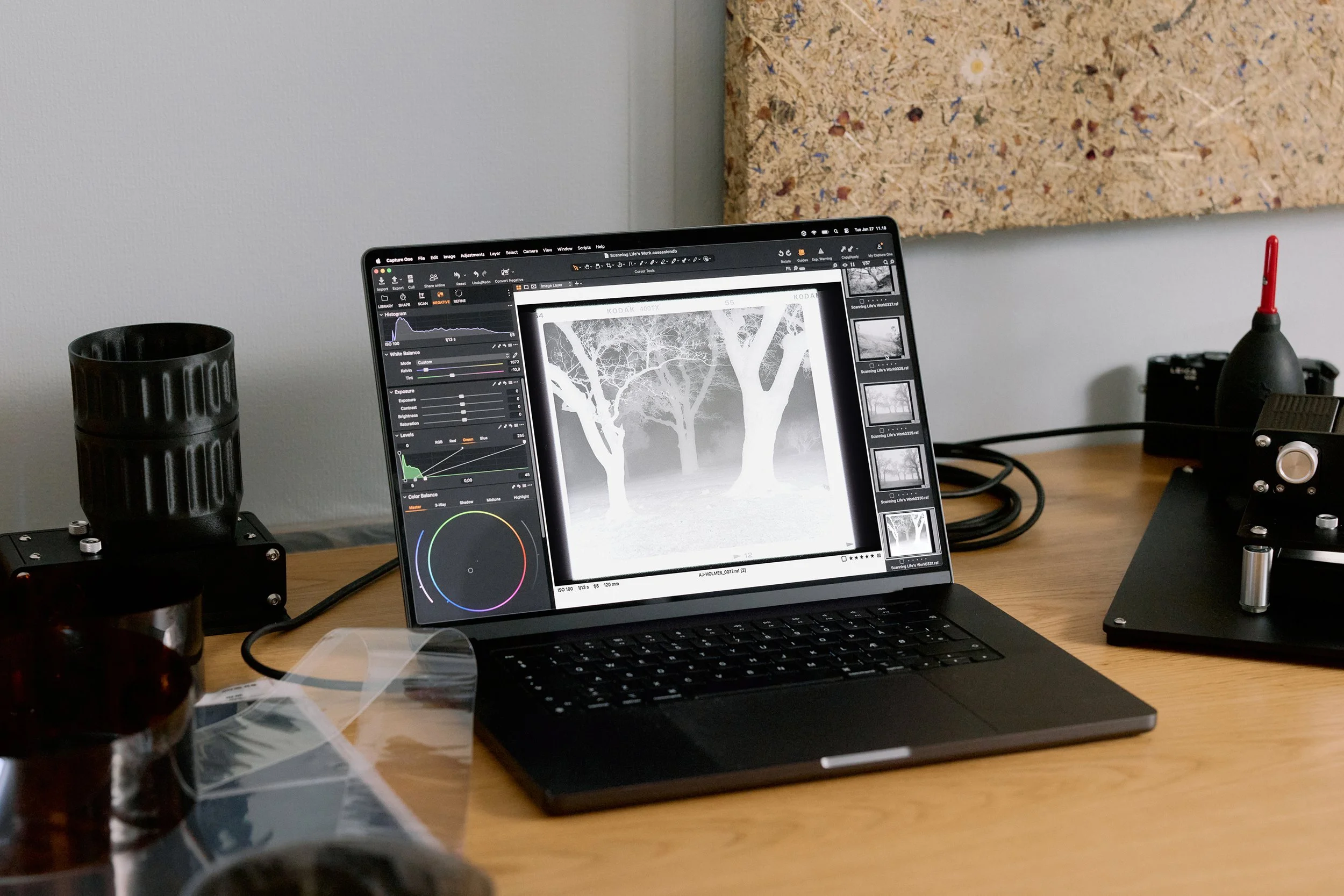
For years, converting color negatives on a computer meant one of two things: Negative Lab Pro inside Lightroom, or FilmLab as a standalone app. Both work. Neither is native to the software most professional photographers actually use for serious editing. That changed in February 2026, when Capture One shipped version 16.7 with a dedicated Film Negative processing mode built directly into its RAW engine. For the first time, a professional-grade editor treats negative conversion as a first-class feature — not a plugin, not a workaround.
Capture One 16.7 treats negative conversion as a native feature, not a plugin. For camera scanners, this changes the entire post-processing workflow.
What Capture One 16.7 Actually Added
The Capture One 16.7.4 Open Beta 2, released February 25, 2026, introduced a Film Negative Mode that switches the RAW processing pipeline to handle scanned negatives. This is not a color inversion filter applied after the fact. The engine itself operates differently when the mode is active — it understands that the tonal curve is inverted, that the orange mask on C-41 film needs removal, and that highlight and shadow relationships are reversed compared to a positive image.
Alongside the mode switch, Capture One added a dedicated Film Conversion Workspace accessible through Window > Workspace. This workspace organizes tools specifically for negative processing, removing the clutter of features irrelevant to scanned film. Two new tool tabs — “Scan” and “Negative” — group the controls you actually need: white balance for the film base, inversion strength, color channel adjustments, and grain management.
The most visible addition is the one-click “Convert Negative” toolbar button. Select your scanned negative, press the button, and Capture One applies its base conversion. From there, you refine using the same tools you already know — curves, levels, color editor — but working on a properly inverted positive rather than fighting an orange-masked negative.
How the Film Negative Pipeline Works
When you activate Film Negative Mode, Capture One reroutes the image through a processing path designed for negative film. The pipeline first identifies and removes the orange base mask — the tinted layer built into every C-41 color negative that exists to improve print color accuracy but causes havoc in digital inversion. The software samples the unexposed film border (or lets you manually select a reference area) to determine the exact mask color, then subtracts it before any tonal adjustments begin.
After mask removal, the engine inverts the tonal curve and remaps color channels. Because this happens at the RAW processing stage rather than as a post-conversion adjustment, Capture One retains the full bit depth and dynamic range of the original scan file. You get cleaner shadows, smoother gradients, and more headroom for color grading than you would with a plugin that operates on an already-processed TIFF or JPEG.
The system supports both tethered camera scanning — shooting negatives directly into Capture One with a digital camera and macro lens — and imported scan files from flatbed or dedicated film scanners. For tethered workflows, the conversion happens automatically as each frame arrives, which turns Capture One into a complete camera scanning station.
Capture One vs. Negative Lab Pro vs. FilmLab 3.5
Negative Lab Pro has been the default tool for camera scanners since its launch. It operates as a Lightroom plugin, using Lightroom's own color engine to invert negatives with generally excellent results. Its strength is simplicity: install the plugin, click convert, adjust a few sliders. The weakness is that it depends entirely on Lightroom — if you prefer Capture One for everything else, you had to maintain a Lightroom subscription just for negative conversion.
FilmLab took a different approach. Its 3.5 Beta, launched around the same period, features a ground-up rebuild of its color science engine. Where Capture One approaches film as a data problem — identify the mask, subtract it, invert mathematically — FilmLab approaches it as an art form. The app attempts to recreate the look of optical printing, where light passes through the negative onto photographic paper. The results are warmer, often more saturated, and closer to what you might get from a traditional darkroom print.
The practical difference comes down to workflow preference. Capture One's native integration means zero context-switching: scan, convert, edit, and export all in one application. Negative Lab Pro offers the deepest community knowledge base and preset library. FilmLab produces the most “analog” look out of the box but requires its own standalone step. There is no objectively correct choice — each serves a different priority.
Why Camera Scanning Is Winning
The fact that Capture One invested engineering resources into a native negative conversion tool tells you something about where the market is heading. Camera scanning — using a digital camera, macro lens, and a film holder like the Valoi easy35 to photograph negatives — has moved from a niche technique to the standard method for serious film photographers.
The reasons are straightforward. A mirrorless camera with a macro lens scans a 36-exposure roll in under ten minutes. A flatbed scanner takes an hour or more for the same roll. Camera scans resolve more detail from 35mm negatives than any flatbed under $2,000, and for medium format, the gap narrows but the speed advantage remains enormous. Systems like the Valoi easy35 or Essential Film Holder make alignment and film handling repeatable, removing the main variable that used to make camera scanning inconsistent.
With Capture One now supporting the full camera scanning workflow natively — from tethered capture to negative conversion to final edit — the software gap that once favored flatbed scanning no longer exists. The dedicated film scanner is not dead, but for photographers already invested in a digital camera system, using that same system to scan film is now the most efficient path from negative to finished image.
A Bigger Signal for Film Photography
Capture One is not a consumer app. It is used by commercial photographers, fashion studios, and high-volume professionals who need tethered capture and precise color control. When software at that level adds native film negative support, it signals that film photography has crossed a threshold — from a hobbyist revival into a workflow that professional tools need to accommodate.
This legitimization matters. It means film scanning improvements will continue as part of regular software updates, not as afterthought plugins maintained by solo developers. It means camera manufacturers building macro lenses and film holders are targeting a growing, not shrinking, audience. And it means that the entire chain from shooting to scanning to editing is becoming more cohesive and more accessible than it has been since the digital transition.
From Negative to Archive
Converting your negatives is the middle step in a longer process. The quality of your conversion depends on the quality of your scan, which depends on proper exposure of the original negative. Knowing what you shot — which film stock, what ISO you rated it at, whether you pushed or pulled in development — directly informs how you process each frame in software.
Pellica's film roll tracker lets you log every detail per frame as you shoot — film stock, exposure settings, lens, and notes. When you sit down to convert negatives in Capture One or any other tool, that metadata is already there. The built-in light meter helps nail exposure before you press the shutter, and the lab finder connects you with development services near you.
Good scanning software converts your negatives accurately. Good shooting data tells you why each frame looks the way it does. The combination is what turns scanning from a chore into a process you actually learn from.